Cutter
Shadeops & RslPlugins


return to main index


Overview

Cutter is designed to ease the task of writing and building DSOs that implement RenderMan shadeops written in the 'C' and rslplugins written in the 'C++' programming language. Cutter's most important feature is that on Linux, Windows and MacOSX, shadeops and rslplugins can be compiled and linked without the need for the user to write and maintain their own Makefile or Windows bat file.

Another feature of Cutter is that it applies special syntax coloration to 'C/C++' language files that it recognizes to be the source code of a shadeop or a rslplugin. For example, a 'C' file is considered to implement a shadeop if it contains one of the following macro names, "SHADEOP_TABLE", "SHADEOP_INIT" or "SHADEOP_CLEANUP". A 'C++' file is recognized as a rslplugin by the presence of the macro name "RSLEXPORT" within its text.

When editing the source code for either a shadeop or a rslplugin, specific Pixar documentation can be conveniently accessed via the keyboard shortcut alt + double click (MacOSC, Apple + double click).


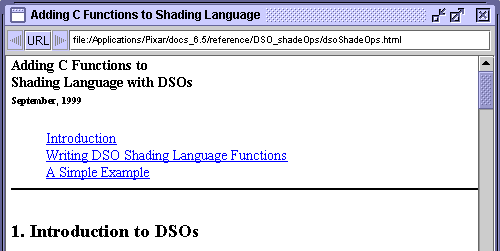
Figure 1


Cutters internal browser, figure 1, will search for the first instance of the word on which the user performed the keyboard shortcut. The next instance of the word can be found using the return key. Alternatively, option + shift + double clicking on a word will cause Cutter to display the web document in the users preferred external browser. Of course, this facility depends on Pixar's documentation being installed on the users computer.
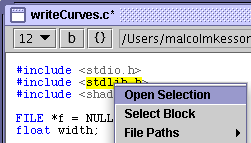


Figure 2


Cutter also enables a user to conveniently open an #include'd header file by control + clicking in the name of the header file - figure 2. Cutter automatically "expands" the selection to the boundaries of the file name - the user does not have to manually select the name of the header file.

Compilation & Linking

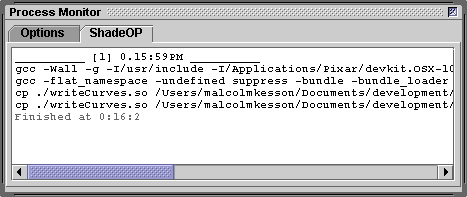
Upon receiving the keyboard shortcut control + e, Cutter attempts to compile and build the users shadeop or rslplugin. It does so by generating a Makefile (Linux and OSX) or a Windows Visual Studio bat file. The Makefile/bat file generated by Cutter is based on an operating specific template file named,

    Makefile.shadeop_LINUX,
    Makefile.shadeop_OSX, or
    Compile_shadeop.bat

Cutter searches for the appropriate template file in the users custom_templates/Makefile, or custom_templates/Bat directory. If a template file is not found, Cutter uses a default template located in its Cutter_Help/templates/Makefile, or Cutter_Help/templates/Bat directory.

The template Makefile for compiling and linking a rslplugin on Linux is shown below.


Listing 1 (Makefile.rslplugin_LINUX)


# Used by Cutter to compile a rsl plugin dso written in the 'C++' programming
# language. A copy of this Makefile can be saved in the users
# "custom_templates/Makefile" directory. If it is named "Makefile.rslplugin_LINUX" 
# Cutter will use it instead of its own template. In this way a user can use their 
# own customized Makefile.
STRICT = -Wall
CFLAGS = ${STRICT} -fPIC -g -I/usr/include -I./ DEVKIT_INCLUDE_PATH OTHER_INCLUDE_PATHS
  
all : YOUR_DSO_NAME.so
  
YOUR_DSO_NAME.so : YOUR_DSO_NAME.cpp OTHER_OBJ_PATHS
    g++ ${CFLAGS} -c YOUR_DSO_NAME.cpp
    g++ -shared YOUR_DSO_NAME.o -o YOUR_DSO_NAME.so  

Within a template Makefile the following strings act as "placeholders",

    DEVKIT_INCLUDE_PATH
    OTHER_INCLUDE_PATHS
    YOUR_DSO_NAME
    OTHER_OBJ_PATHS

Cutter copies the text from a template file and substitutes the placeholders with the appropriate information derived from the name of the 'C/C++' file the user is editing and from information found in preferences. Therefore, it is essential the user has correctly setup their prefs.


Setting Up the ShadeOP/RslPlugin Preferences

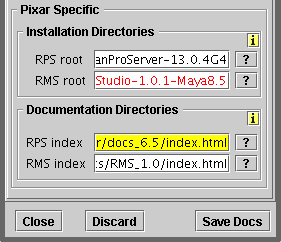
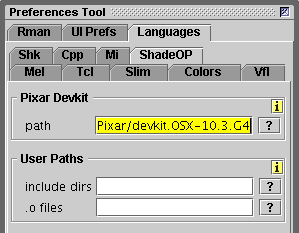
The preferences for "Rsl C/C++" is shown in figure 3. The first path should specify the location of the devkit directory in which the lib and include directories that support the development of shadeops/rslplugins are located.


Figure 3


The "User Paths", shown above, should specify the full path to the users include and lib directories. If a user wishes to customize Cutter's Makefile/bat file functionality they can do so by copying the template Makefile/bat file from Cutter_Help to their custom_templates directory. Then its a matter of editing the file. Cutter will use the users Makefile/bat file in preference to its own default template.

The other preference, figure 4, that should be set is,

   Rman->Docs->Documentation Directories->RPS index


Figure 4


DSO Locations

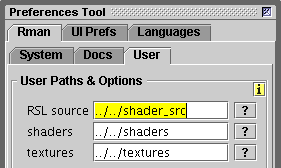
If compilation and linking are successful, a DSO will be created in the same directory as the users 'C/C++' source code. If the user has set their "User Paths & Options" (figure 5), additional copies of the DSO will be saved in the users "shaders" and "RSL source" directories.


Figure 5


© 2002- Malcolm Kesson. All rights reserved.