RIB/RSL
Introduction to Primvars


Related Tutorials:

      Using Primvars with HyperShade
      Primvars and Custom Slim Nodes


return to main index


Introduction

In the RenderMan terminology an item of data that is "bound" to a geometric primitive is called a "primitive variable" or "primvar" for short. The values of a primvar are intended to effect the way a geometric primitive is shaded. This tutorial provides a brief overview of primvars, how they are specified in a rib file and how they are declared in the parameter list of a shader .


Shading without a primvar

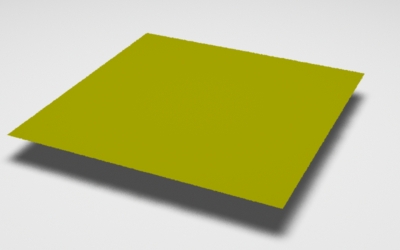
Figure 1 shows a polygon that has been rendered yellow because the "plastic" shader assigned to it takes a variable named "Cs" into account when it sets the final (apparent) color of a surface. "Cs" is an internal variable of prman that stores the true surface color of an object - generally derived directly from the value of the Color statement that appears immediately before the geometry that is being shaded.

    Color 1 1 0
    Surface "plastic" "Kd" 1 "Ks" 0 
    Polygon "P" [-0.5 0 -0.5  -0.5 0 0.5  0.5 0 0.5  0.5 0 -0.5]


Figure 1


For more information about "Cs" and its use by the RenderMan shading language refer to the tutorial RSL:Writing Surface Shaders.


Shading via a primvar

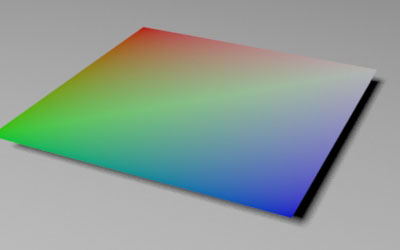
In the next snippet of rib, the polygon has been given a primvar with a name that matches prman's "Cs" variable.

    Color 1 1 0
    Surface "plastic" "Kd" 1 "Ks" 0 
    Polygon "P" [-0.5 0 -0.5  -0.5 0 0.5  0.5 0 0.5  0.5 0 -0.5]
            "Cs" [1 0 0   0 1 0   0 0 1   1 1 1]

Because the polygon has 4 vertices, the primvar can bind 4 rgb values - one for each vertex. As each micropolygon is shaded, the shader uses "Cs" color values that have been smoothly interpolated by prman across the surface of the polygon. In effect, the "Cs" primvar has "hidden" the rgb value of the Color statement.


Figure 2


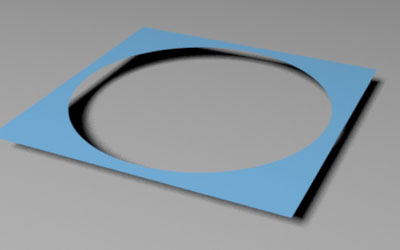
In the next snippet of rib a shader called "hole" (listing 3) has been assigned to the polygon, its "radius" parameter sets the size of a circular patch of transparency (figure 3).

    Color 1 1 0
    Surface "hole" "float radius" 0.35 
    Polygon "P" [-0.5 0 -0.5  -0.5 0 0.5  0.5 0 0.5  0.5 0 -0.5]
            "Cs" [1 0 0   0 1 0   0 0 1   1 1 1]


Figure 3


As a single parameter the value of "radius" is constant for all the micropolygons shaded by "hole". When a primvar named "radius" is bound to the polygon its values are also smoothly interpolated across the surface.

    Color 1 1 0
    Surface "hole" "float radius" 0.35 
    Polygon "P" [-0.5 0 -0.5  -0.5 0 0.5  0.5 0 0.5  0.5 0 -0.5]
            "Cs" [1 0 0   0 1 0   0 0 1   1 1 1]
            "varying float radius" [0.2 0.5 0.1 0.4]


Figure 4


In effect, each micropolygon uses a different value of "radius" and as a consequence an irregular patch of transparency is created - figure 4. However, because "radius" is not a default variable its datatype must be specified in the rib ie. "varying float radius". The word "varying" specifies what is known as the "detail". In effect, it tells prman that each vertex will be given its own value of "radius".

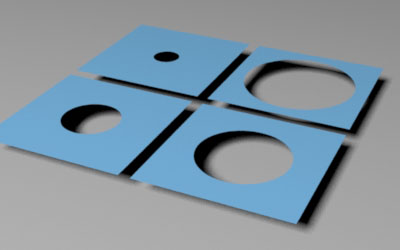
Alternatively, the primvar could be declared as "constant float radius", in which case only one value of "radius" will be supplied. For example, the next snippet of rib creates 4 polygons each with their own (single) value for "radius".

    Surface "hole"
    TransformBegin
        Translate -0.27 0 -0.27
        Polygon "P" [-0.25 0 -0.25  -0.25 0 0.25  0.25 0 0.25  0.25 0 -0.25] 
                "constant float radius" [0.05]
    TransformEnd
    TransformBegin
        Translate -0.27 0 0.27
        Polygon "P" [-0.25 0 -0.25  -0.25 0 0.25  0.25 0 0.25  0.25 0 -0.25] 
                "constant float radius" [0.1]
    TransformEnd
    TransformBegin
        Translate 0.27 0 0.27
        Polygon "P" [-0.25 0 -0.25  -0.25 0 0.25  0.25 0 0.25  0.25 0 -0.25] 
                "constant float radius" [0.15]
    TransformEnd
    TransformBegin
        Translate 0.27 0 -0.27
        Polygon "P" [-0.25 0 -0.25  -0.25 0 0.25  0.25 0 0.25  0.25 0 -0.25] 
                "constant float radius" [0.2]
    TransformEnd


Figure 5


For more information about "detail" refer to Pixar's,
    "Application Note #22 - Class Specifiers for Primitive Variables".


RSL Parameter Declaration

The RSL declaration of a parameter that will be used as a primvar is straightforward. For example, the "hole" shader shown next must have its "radius" parameter declared as "varying" otherwise it is, by default, considered to be a uniform float - in which case prman will not smoothly interpolate its value across a surface.


Listing 1 (hole.sl)


surface
hole(float Kfb = 1;
   varying float radius = 0.5)
{
point p = transform("object", P);
point o = transform("object", point "object" (0,0,0));
float dist = distance(p, o);
  
Oi = smoothstep(radius - 0.01, radius + 0.01, dist);
Ci = Oi * Cs * Kfb;
}

For information about the setting up and use of primvars with RenderMan Studio refer to the tutorial "RMS: Using Primvars with HyperShade".


© 2002- Malcolm Kesson. All rights reserved.