RenderMan
|
Introduction
This tutorial covers the basic issues of dealing with the RenderMan's
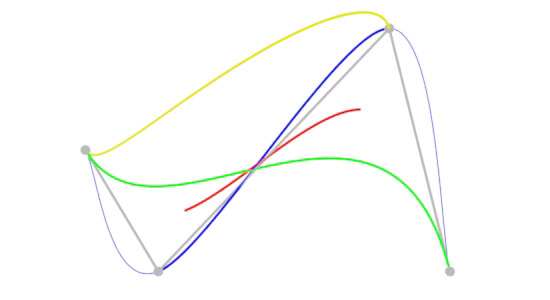
b-spline bezier catmull-rom hermite The cv's are shown as black disks while the connecting lines show the sequence of cv's.
There is a clear difference between the curves. In particular, notice the green bezier curve is the only one to begin and end at the first and last cv. The rib statements used to render the bezier curve are, Basis "bezier" 3 "bezier" 3
Curves "cubic" [4] "nonperiodic"
"P" [-0.75 0 0.5 -0.45 0 1 0.5 0 0 0.75 0 1]
"constantwidth" [0.005]
"Cs" [0 1 0 0 1 0]
The rib file used to render figure 1 is shown in listing 1. |
|
Listing 1 (curves.rib)
Curves generated by Maya and mtor/Rfm the curve type is "b-spline" ie. Basis "b-spline" 1 "b-spline" 1 |
Control Vertices
Although it may appear a RenderMan curve can be defined by
an arbitary number of cv's, infact, the number of cv's must conform
to formula determined by the type of curve being rendered. The simpliest
curve type to use is a "b-spline" because it can be defined by any number
of cv's - greater than 4. However, in general, a "b-spline" curve does
not begin and end at the first and last cv unless the point data for those
cv's are repeated twice. For an example of how RenderMan Studio writes
a |
Curve SegmentsThe RenderMan Interface Specification allows "attributes" to be bound to each segment or span of a curve. Looking at a curve, from the "outside", it is defined by,
From the point of view of the renderer, from the "inside", a curve consists of a number of segments (spans).
For example, figure 2 shows a b-spline curve that consists of 9 cv's (the first and last cv's have been repeated twice). The curve has (cv's - 2) segments and each of them was assigned a width ie. Curves "cubic" [9] "nonperiodic"
"P" [0 0 0 0 0 0 0 0 0 1 0 0 2 0 0
3 0 0 4 0 0 4 0 0 4 0 0]
# one width for each of the 7 segments
"width" [0.01 0.1 0.01 0.1 0.01 0.1 0.01]
|
|
Surface color "
Curves "cubic" [9] "nonperiodic"
"P" [0 0 0 0 0 0 0 0 0 1 1 0 2 -1 0
3 1 0 4 -1 0 4 -1 0 4 -1 0]
"constantwidth" [0.03]
"Cs" [1 1 1
1 1 1
1 0 0
0 1 0
0 0 1
1 1 1
1 1 1]
|
|
Figures 4, 5 and 6 illustrate what happens when the first and last cv's are not repeated, repeated once and repeated twice. |
|
|
|
|
Python Curves GeneratorIt is sometimes useful to generate a complex curve consisting of an arbitary number of cv's. Listing 2 gives a python script that outputs a rib file that may be referenced as a pre-baked (listing 3). The curve is defined by random cv's constrained to lie on the surface of a sphere. |
|
Listing 2 (curves.py)
|
ReadArchiveAfter executing the python script the pre-baked rib that is generated may be rendered with the rib file shown in listing 3. The result of outputing 400 cv's is shown in figure 7. |
|
Listing 3 (archiveTester.rib)
|
© 2002- Malcolm Kesson. All rights reserved.