RenderMan
Maya Curves to Rman Curves


return to main index


Introduction

This tutorial provides information about the scripting of curves in Maya for use with RenderMan Studio (RMS). A similiar tutorial "Rat: Maya Curves to Rman Curves" provides information for RenderMan Artist Tools (RAT). The RfM Pro plugin enables Maya curves to be rendered with prman. The plugin identifies a Maya curve as one that should be rendered if it has been assigned the attributes,

    rman__toattr___curveTipWidth
    rman__toattr___curveBaseWidth

These attributes can can be assigned via the GUI, figure 1, by selecting a curve and then choosing,

    Attributes->RenderMan->Add Rendering Attrs
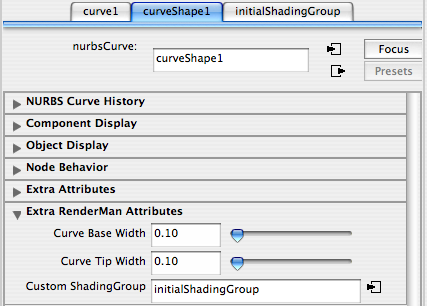

Figure 1


It is often convenient, especially if a number of curves have been created with a mel script, to assign the rman attributes from the same script that produced the curves, refer to listing 2.


Listing 1 (mel script)


// create a simple curve
curve -d 1  -p 0 0 0 -p 0 1 0;
  
// get the name of the shape node
string $shape[] = `listRelatives -s`;
  
// add the rman attributes plus their values
addAttr -ln "rman__torattr___curveTipWidth" -dv 0.2  -k true $shape[0];
addAttr -ln "rman__torattr___curveBaseWidth" -dv 0.2  -k true $shape[0];
  
// get the name of the custom shading group attribute
string $attrnm=`rmanGetAttrName customShadingGroup`;
  
// add the "customShadingGroup" attribute plus its value
rmanAddAttr $shape[0] $attrnm "initialShadingGroup";


Maya cv's & RenderMan cv's

The number of cv's specified by a mel script may not result in the same number of cv's defined in the corresponding rib statement. For example, a Maya curve created using this mel command,

    curve -d 1  -p 0 0 0 -p 1 0 0;

would be expressed in a (pre-baked) rib file as,


Listing 2 (curveShape1_0.job.rib)


    version 3.04
    Declare "linear" ""
    Declare "nonperiodic" ""
    Curves "linear" [4] "nonperiodic" "P" [0 0 0 0 0 0 0 1 0 0 1 0]
           "constant float constantwidth" [0.2]
           "constant string primtype" ["curves"]

Because of the way that RfM Pro structures its rib files the Basis for the curve is specified in another rib file that is read by the renderer immediately before rendering the curve, listing 3.


Listing 3 (curveShape1_0_attr.job.rib)


version 3.04
Basis [ -0.166667 0.5 -0.5 
         0.166667 0.5 -1 
         0.5      0   -0.5 
         0        0.5  0  
         0.166667 0.666667 0.166667 0 ] 1 
      [ -0.166667 0.5 -0.5 
         0.166667 0.5 -1 
         0.5      0   -0.5 
         0        0.5  0  
         0.166667 0.666667 0.166667 0 ] 1

b-spline curves must be defined by no less than 4 cv's. RfM Pro repeats the first and last points twice when it writes the Curves rib statement - listing 2. This is to ensure the curve "physically" begins and ends at the first and last cv. In mel we might have a cubic curve defined by 5 cv's ie.

    curve -d 3  -p 0 0 0 -p 1 1 0 -p 2 -1 0 -p 3 1 0 -p 4 -1 0;

The same curve written into a rib file would look like this,


Listing 4


Curves "linear" [9] "nonperiodic" 
            # 2 repeats                                        2 repeats
       "P" [0 0 0  0 0 0   0 0 0 1 1 0 2 -1 0 3 1 0 4 -1 0   4 -1 0  4 -1 0]
       "constant float constantwidth" [0.2]
       "constant string primtype" ["curves"]


© 2002- Malcolm Kesson. All rights reserved.