Figure 1
A Slim Appearance Document plus a pre-compiled Shader
Slim
|
Praparing a Shader to be Imported into Slim
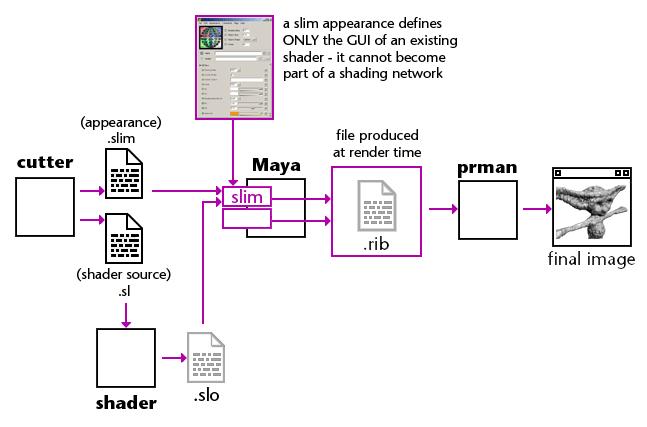
Figure 1 shows two files, ".slim" and ".sl", saved from Cutter.
Although any text editor can be used to write a shading language
source code (".sl") file, the advantage of editing ".sl" files with Cutter is
that when it compiles a ".sl" file, using Pixar's shader compiler, it automatically
generates a ".slim" appearance file. For more information about Cutter and
slim refer to, |
|
|
|
Strickly speaking it is unnecessary to prepare a Slim appearance file
in addition to the shader itself. Any compiled shader can be imported by
Slim. However, because a Slim appearance document contains specific GUI
information that determines the exact appearance of the editor that will
be used by an artist to control the parameters of a shader, such documents
offer important benefits.
|
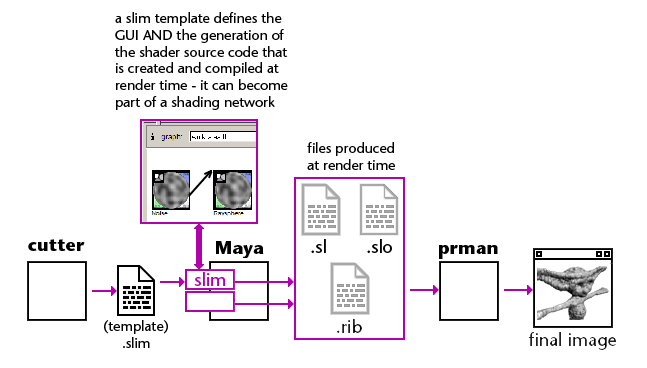
Praparing a Slim Template to be used to Create Nodes in SlimThe next diagram, figure 2, shows a slim template has been prepared using Cutter. Again, any text editor can be used to write a template but Cutter can significantly ease the pain of doing so because it has some ability to automatically create a template file from either a shader source code document or a user-defined RSL function. |
|
|
|
A Slim template document is essentially a Slim appearance with some additional text that describes how Slim should generate its own shader source code file. When a node created from the template is attached to an object in Maya and rendered, a temporary source code file is saved in, maya/projects/default/rmanshader/tmp (RAT)
maya/projects/default/renderman/untitled/slimshaders/temp (RMS)
Immediately after the source code has been created it is compiled and subsequently used by the renderer. As the far as the renderer is concerned it is using a "regular" shader. The fact that, in most circumstances, the (temporary) shader is the result of an artist using a mouse driven GUI to make a shading network of connected "nodes" is of little consequence except that the shading artist is shielded from the RSL source code. Consequently, they are free to create shading networks that can, potentially, generate inefficient shaders. |
Trust MayaOf course if you are of the opinion that Maya can do everything then...
|
© 2002- Malcolm Kesson. All rights reserved.